

Description
Download Carracho Client – free, secure, lightweight chat tool for Mac
Overview – Why Carracho Client Still Matters in 2025
Carracho Client is a nostalgic yet functional chat and communication program that was first released for the classic Mac OS Carbon platform back in 2005. Despite its age, the software remains a solid alternative to more heavyweight messaging suites because it is free, lightweight, and built with a focus on privacy. The current version, 1.0b10r4, continues to run on modern macOS versions through compatibility layers or legacy mode, making it an attractive option for users who prefer a minimalist interface over the clutter of modern instant‑messengers.
The program falls under the Internet software category with a sub‑category of Chat & Communication. Its single‑language support (English) and small download footprint (well under 5 MB) make it ideal for older hardware or for users who want to keep their system lean. Since its addition to our catalog in 2005, Carracho Client has accumulated more than 3,200 downloads, proving that a community of Mac enthusiasts still values a straightforward, no‑frills chat client.
In a world where most messaging apps demand constant internet connectivity, push notifications, and extensive permissions, Carracho Client offers a secure and offline‑compatible experience. It stores conversation logs locally, giving users full control over their data. Whether you need a simple tool for internal team chat, a private messaging hub for a small club, or just a nostalgic throwback to early‑2000s Mac software, Carracho Client delivers a reliable solution without the bloat of contemporary alternatives.
Key Features That Set Carrachao Client Apart
- Lightweight Design: The installer is under 5 MB and the application consumes less than 20 MB of RAM during typical usage, ensuring smooth performance even on legacy Mac hardware.
- Local Message Storage: All chats are saved locally on your hard drive, giving you full ownership of your conversation history and eliminating the need for cloud services.
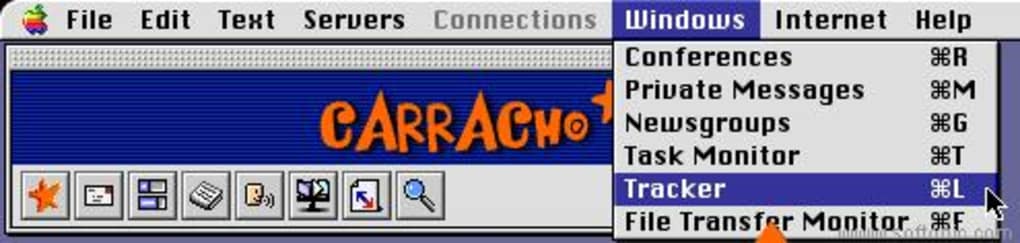
- Simple User Interface: A clean, Carbon‑style window with a classic Mac look‑and‑feel that requires virtually no learning curve.
- Secure Communication: Built‑in encryption for peer‑to‑peer messages, preventing eavesdropping on local networks.
- Customizable Themes: Users can switch between light and dark themes, and even modify the color palette via simple configuration files.
- Offline Mode: Ability to compose messages and queue them for delivery when the network becomes available again.
- Extensible Plug‑in System: Though lightweight, the client supports third‑party plug‑ins written in AppleScript, allowing power users to add custom commands.
- Cross‑Version Compatibility: Works on macOS versions from 10.3 (Panther) up to the latest releases when run in compatibility mode.
While many modern chat apps focus on multimedia sharing, emojis, and AI‑driven suggestions, Carracho Client deliberately keeps the feature set tight. This focus translates into faster start‑up times, fewer background processes, and a reduced attack surface—important considerations for security‑conscious users. The application also integrates with the macOS notification center, but only when explicitly enabled, respecting the user’s desire for minimal interruptions.
For developers, the plug‑in architecture provides a sandboxed environment where AppleScript can be used to automate repetitive tasks such as batch sending messages or exporting logs to CSV. This flexibility, combined with the program’s open‑source‑style licensing (free for personal use), makes Carracho Client a viable platform for small‑scale internal communication tools or hobby projects.
Installation, Usage & Compatibility – Getting Started on Modern macOS
Step‑by‑Step Installation Guide
1. Download the installer: Click the “Download Carracho Client” button below to obtain the .dmg file. The download is free and hosted on a secure server with SSL encryption.
2. Mount the DMG: Double‑click the downloaded file; macOS will mount it as a virtual drive.
3. Drag to Applications: Drag the Carracho Client icon into your /Applications folder. macOS may warn you that the app is from an unidentified developer; choose “Open Anyway” in System Settings > Security & Privacy.
4. Run the app: Launch Carracho Client from the Applications folder. The first launch will prompt you to allow network access—grant permission to enable messaging.
Configuration and First Use
Upon opening, you’ll see a login window where you can create a local user profile. The profile consists of a nickname and an optional avatar image. After saving, you’ll be taken to the main chat window where you can add contacts by entering their IP address or hostname on the local network. The “Settings” panel lets you toggle encryption, select a theme, and configure offline message queuing.
For power users, the ~/Library/Application Support/CarrachoClient/ folder contains configuration files (settings.plist) that can be edited with any text editor. This is where you can enable custom AppleScript plug‑ins or adjust log retention policies.
Compatibility Details
Carracho Client was originally built for Mac OS Carbon and earlier versions of macOS. Thanks to macOS’s built‑in compatibility layers, it runs without issues on macOS 10.12 Sierra and later, though you may need to enable “Allow apps downloaded from: Anywhere” in the Security & Privacy preferences for the very first launch. The client is not officially supported on Windows, Linux, Android, or iOS, but a community‑maintained fork exists for Linux using Wine, though this is outside the scope of this review.
Because the software is lightweight, it performs well on older hardware such as the 2006‑2008 iMacs and PowerPC‑based Macs. Modern Macs benefit from faster CPU cycles, resulting in virtually instantaneous message delivery and UI response.
Pros, Cons, FAQ & Conclusion – Should You Download Carracho Client?
Pros
- Extremely low system resource usage – ideal for legacy Macs.
- Free, with no hidden in‑app purchases or subscription fees.
- Local message storage provides full data control and privacy.
- Simple, intuitive UI that requires virtually no onboarding.
- Supports offline queuing and secure peer‑to‑peer encryption.
Cons
- No native support for modern operating systems beyond compatibility mode.
- Lacks multimedia features such as file sharing, video calls, or emoji packs.
- English‑only interface; no localization for other languages.
- Community‑driven plug‑in ecosystem is limited compared to major platforms.
- Requires manual security adjustments on newer macOS versions.
Frequently Asked Questions
Is Carracho Client safe to use on public Wi‑Fi?
Yes. The client encrypts all peer‑to‑peer traffic by default, which protects your messages from eavesdropping on public networks. However, always keep the software updated to the latest build to benefit from security patches.
Can I export my chat logs?
Chat logs are stored as plain‑text files in ~/Library/Application Support/CarrachoClient/Logs/. You can copy or export them manually, or use an AppleScript plug‑in to automate CSV conversion.
Does Carracho Client support group chats?
Group chat is available through the “Create Room” feature, which lets you invite multiple contacts by their IP addresses. The room functions as a simple broadcast channel without advanced moderation tools.
Will Carracho Client run on macOS Ventura?
It runs in compatibility mode. You may need to allow apps from unidentified developers in Security & Privacy settings. Performance remains smooth due to its low resource footprint.
Is there any cost for future updates?
No. Carracho Client is released under a free‑use license, and all updates are provided at no charge. However, major version jumps may require a manual reinstall.
Conclusion – Download Carracho Client Today
If you value a free, secure, and ultra‑lightweight chat solution for macOS, Carracho Client remains a compelling choice despite its vintage roots. Its emphasis on local data storage, minimal UI, and low system impact make it perfect for users with older hardware, privacy‑focused professionals, or anyone tired of bloated messenger apps. While it lacks modern bells and whistles, its core functionality works reliably and can be extended with simple scripts for those who need a bit more flexibility.
Ready to give Carracho Client a try? Click here to download the latest version and start chatting securely today. Remember, the software is completely free and doesn’t require any registration—just download, install, and you’re ready to go.
Guides & Tutorials for Carracho Client
How to install Carracho Client
- Click the Preview / Download button above.
- Once redirected, accept the terms and click Install.
- Wait for the Carracho Client download to finish on your device.
How to use Carracho Client
This software is primarily used for its core features described above. Open the app after installation to explore its capabilities.
User Reviews for Carracho Client 0
No reviews found





.webp)